
Best labels and branding supplies for home bakers: 7 picks to make your products look professional
Find the best labels and branding supplies for home bakers. 7 picks from budget to pro, with real prices, pros and cons, and a complete starter kit under $77.

Malik
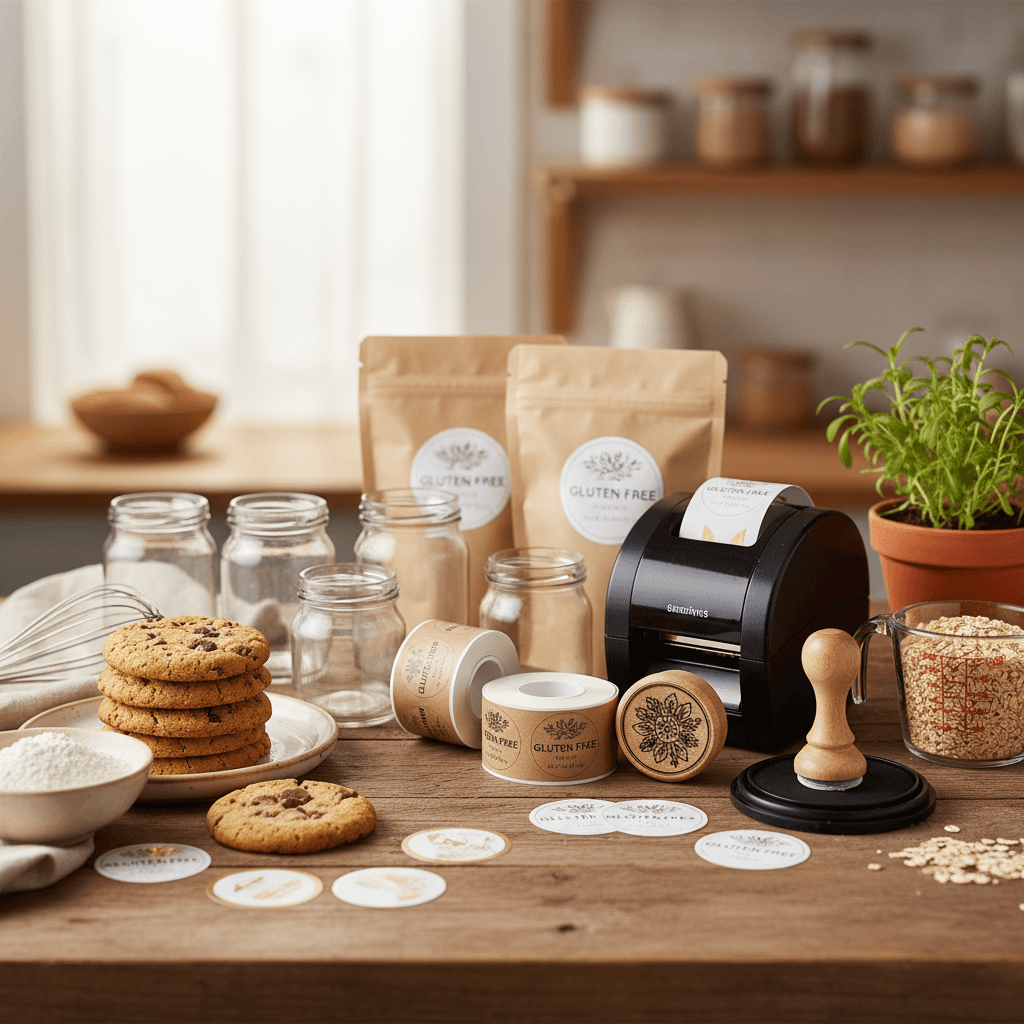
Professional-looking labels and branding are what separate a home bakery that gets repeat orders from one that gets overlooked. Here are the best labels, stickers, stamps, and branding supplies for home bakers at every budget, so your baked goods look as good on the outside as they taste on the inside.
Key takeaways
- Best overall label printer: The Rollo wireless thermal printer gives you unlimited labels without ink costs, paying for itself within a few months of regular use.
- Best budget option: Avery printable kraft labels with free design templates let you create professional labels for under $15.
- Custom rubber stamps are a one-time investment that adds a handmade, artisan feel to bags, boxes, and tissue paper.
- Waterproof labels matter for refrigerated or frozen items — matte vinyl labels hold up where paper labels smear and peel.
- Your label is often the first thing a customer sees, and a polished look supports the premium pricing your baked goods deserve.
- You can build a complete branding starter kit for under $75 that covers labels, stickers, stamps, and thank-you cards.
Why labels and branding matter for home bakers
When someone picks up your cookies at a farmers market or receives a delivery order, your packaging and labels are doing the selling before they ever take a bite. A clean, consistent brand builds trust, justifies higher prices, and makes your products instantly recognizable. If you have already worked through your packaging setup, labels and branding are the natural next step.
Many states also require specific information on cottage food labels, including your business name, ingredients list, allergen warnings, and a "made in a home kitchen" disclaimer. Having a reliable labeling system makes compliance easy instead of stressful. Check your state's cottage food laws for exact requirements.
Best overall: Rollo wireless thermal label printer
The Rollo Wireless Thermal Label Printer is the single best investment a home baker can make for labeling. It prints crisp, professional labels without ink or toner — the thermal printing technology means your only ongoing cost is the label rolls themselves. At roughly $200, it is not cheap upfront, but home bakers who print even 50 labels a week recoup that cost within a few months compared to inkjet printing.
Approximate price: $199
Pros:
- No ink or toner costs ever — thermal printing only
- Prints up to 4x6 labels, perfect for ingredient lists and nutrition facts
- Works with Canva, Avery, and most design software
- Wireless printing from phone or computer
- Extremely fast — prints a label in about one second
Cons:
- Higher upfront cost than printable sheet labels
- Only prints in black (no color), though this looks clean and professional on kraft or white labels
- Thermal labels can fade in direct sunlight over time
For the look, think clean black text on kraft or white stock. It gives a modern artisan aesthetic that works beautifully on cookie bags, bread sleeves, and cake boxes. If you are selling at farmers markets or doing weekly delivery orders, this printer will save you hours.
Best budget pick: Avery printable kraft labels
Avery Printable Kraft Brown Round Labels (22808) are the easiest and most affordable way to get professional-looking labels right now. You design them using Avery's free online templates, print them on any inkjet or laser printer, and peel-and-stick. A pack of 120 labels costs around $12, which works out to about 10 cents per label.
Approximate price: $12 for 120 labels
Pros:
- Extremely affordable — great for testing designs before committing
- Free Avery Design & Print templates with pre-sized layouts
- Kraft brown finish looks warm and artisanal on any packaging
- Available in round, rectangle, and scalloped shapes
- Works with any home printer
Cons:
- Not waterproof — ink can smear if products are refrigerated or condensation forms
- Print quality depends on your home printer
- You will need to replace ink cartridges regularly if printing in volume
These labels look fantastic on cellophane cookie bags and kraft paper boxes. The brown kraft finish paired with simple black text gives that "small-batch artisan" look that customers love. If you are just starting your home bakery and want to keep costs low, start here.
Best for waterproof labels: Online Labels waterproof matte vinyl
If you sell anything that gets refrigerated, frozen, or transported in coolers, you need waterproof labels. Online Labels Weatherproof Matte Vinyl Sheets are the best option for home bakers who need labels that will not smear, peel, or bleed when exposed to moisture.
Approximate price: $25 for 100 sheets (various label counts per sheet depending on size)
Pros:
- Truly waterproof — survives refrigeration, freezing, and condensation
- Matte finish looks professional, not cheap or plasticky
- Compatible with laser printers (check your model)
- Multiple sizes and shapes available
Cons:
- Requires a laser printer for best results (inkjet versions exist but are less durable)
- More expensive per label than paper options
- Slightly harder to write on if you need to add handwritten dates
These are especially useful if you are selling bread from home and customers store loaves in the freezer, or if you do any catering work where food sits on ice.
Best custom rubber stamp: Trodat Printy self-inking stamp
A custom rubber stamp is a one-time purchase that adds an artisan, handmade feel to everything it touches. The Trodat Printy 4927 Self-Inking Custom Stamp lets you stamp your logo, business name, or a "thank you" message directly onto bags, tissue paper, boxes, and cards. It is surprisingly versatile and costs a fraction of what custom printed packaging would.
Approximate price: $25-35 (custom design included)
Pros:
- One-time cost — thousands of impressions per ink pad
- Self-inking mechanism is fast and clean
- Works on paper bags, tissue paper, boxes, and cardstock
- Upload your own logo or use their design tool
- Replacement ink pads cost under $5
Cons:
- Single color only (typically black, though other ink colors are available)
- Does not work well on glossy or coated surfaces
- Image size limited to about 1.5" x 2.5" for the 4927 model
We love the look of a custom stamp on kraft tissue paper inside a box — it turns basic packaging into something that feels curated and intentional. Pair this with your Avery labels and you have a cohesive brand without spending hundreds on custom-printed packaging.
Best thank-you cards: Canva-designed cards printed on heavyweight cardstock
Including a small thank-you card with every order is one of the simplest ways to build loyalty and encourage repeat business. Rather than recommending a specific pre-made card, we recommend designing your own in Canva (free version works perfectly) and printing on 110lb Heavyweight Cardstock. Cut them to business card or postcard size.
Approximate price: $15 for 250 sheets of cardstock (yields 1,000+ cards depending on size)
Pros:
- Completely customizable — include your logo, social media handles, reorder info
- Extremely low cost per card (under 2 cents each)
- Thick cardstock feels premium in hand
- Can double as a business card at markets
Cons:
- Requires a printer and some design time
- Cutting to size takes effort (a paper trimmer helps)
- Home printer color quality may not match professional printing
On the back of your thank-you card, include a QR code linking to your order page or social media. This is a low-effort, high-impact move for getting repeat customers.
Best sticker seals: custom logo stickers from Sticker Mule or Amazon
Round sticker seals on bags and boxes are a small detail that makes a big impression. You can order custom stickers with your logo from Sticker Mule (which often runs $19 deals for 50 custom stickers) or go the Amazon route with custom logo sticker rolls that cost roughly $15-25 for 500 stickers.
Approximate price: $15-25 for 500 stickers (Amazon custom rolls)
Pros:
- Professional, polished look — seals bags and boxes beautifully
- Very affordable per unit (3-5 cents each)
- Available in matte, glossy, or kraft finishes
- Customers often keep or notice branded stickers
Cons:
- Minimum order quantities (usually 500+)
- Turnaround time of 1-2 weeks for custom orders
- You need a finalized logo before ordering
A 1.5-inch round sticker on a cellophane bag of cookies or sealing a cake box closed is one of those touches that makes customers feel like they are buying from a real business. Because they are.
Best label design tool: Canva free plan
You do not need to hire a graphic designer to create great labels. Canva's free plan has thousands of label templates, and you can customize colors, fonts, and layouts to match your brand. It exports print-ready PDFs that work with Avery templates, the Rollo printer, and any standard home printer.
Approximate price: Free (Pro plan is $13/month but not necessary)
Pros:
- Thousands of bakery-specific templates
- Drag-and-drop interface — no design skills needed
- Exports high-resolution PDFs for printing
- Works directly with Avery label dimensions
- Brand Kit feature (Pro) saves your colors and fonts for consistency
Cons:
- Some premium elements require the paid plan
- Can be overwhelming with so many options
- Limited to what templates and fonts are available (though the selection is huge)
Our recommendation: pick one or two fonts, one accent color, and your logo. Use them on everything — labels, stickers, thank-you cards, social media. Consistency is what makes a brand look professional, not complexity.
Labels and branding supplies comparison
| Product | Best for | Approx. price | Ongoing costs |
|---|---|---|---|
| Rollo Wireless Thermal Printer | Best overall / high volume | $199 | Label rolls only (~$15/500) |
| Avery Kraft Labels (22808) | Best budget pick | $12 / 120 labels | Printer ink |
| Online Labels Waterproof Vinyl | Refrigerated / frozen items | $25 / 100 sheets | Laser toner |
| Trodat Printy Custom Stamp | Artisan branding on packaging | $25-35 | Replacement pads ~$5 |
| 110lb Heavyweight Cardstock | Thank-you / business cards | $15 / 250 sheets | Printer ink |
| Custom Logo Sticker Rolls | Bag and box seals | $15-25 / 500 | Reorder as needed |
| Canva Free Plan | Label and card design | Free | Free (Pro $13/mo optional) |
How to choose the right labeling setup for your home bakery
Your ideal setup depends on your volume and where you are in your business. Here is a simple framework:
Just starting out (under 20 orders per week): Avery kraft labels, a custom stamp, and Canva. Total investment under $50. This gives you a clean, consistent look without committing to expensive equipment.
Growing steadily (20-50 orders per week): Add a Rollo thermal printer and custom sticker rolls. The printer eliminates ink costs and speeds up your workflow dramatically. Your per-label cost drops and your labels look more consistent.
Scaling up (50+ orders per week): At this volume, consider adding waterproof vinyl labels for any refrigerated products and investing in Canva Pro for the Brand Kit feature. You might also look into professional printing for stickers and cards in bulk to save time. If you are at this stage, our guide on scaling a home bakery covers the operational side of growing.
Tips for designing labels that sell
Keep it simple and readable
The most common mistake we see is cramming too much onto a small label. Your brand name and product name should be the two most prominent elements. Ingredient lists and legal disclaimers can be in smaller text. Use no more than two fonts — one for headings and one for body text.
Choose a consistent color palette
Pick two or three colors and use them on everything. Kraft brown plus black is a classic combination that always looks good. White with a single accent color is another safe choice. Consistency across your labels, stickers, and cards is what makes you look established.
Include required legal information
Most cottage food states require your business name, a list of ingredients, allergen information, your name and address, and a statement that the product was made in a home kitchen. Design your label with space for all of this. If you are selling gluten-free cookies or other allergen-friendly products, your labels need to clearly communicate that — it is one of your biggest selling points.
Add a QR code
A small QR code on your label or thank-you card that links to your ordering page or Instagram is a low-cost way to drive repeat business. Canva has a built-in QR code generator. This is especially effective at farmers markets where people want to reorder later.
Your starter kit: everything you need to get started
If you are launching your home bakery and want to look professional from day one without overspending, here is exactly what to buy:
| Item | Product | Approx. cost |
|---|---|---|
| Labels | Avery Kraft Round Labels (22808) | $12 |
| Stamp | Trodat Printy Custom Stamp | $30 |
| Thank-you cards | 110lb Heavyweight Cardstock | $15 |
| Design tool | Canva (free plan) | $0 |
| Sticker seals | Custom Logo Sticker Roll (500 ct) | $20 |
Total estimated starter kit cost: $77
This gives you branded labels, a custom stamp for bags and tissue paper, thank-you cards for every order, and sticker seals to close your packaging. Combined with solid packaging, this setup will make your home bakery look like it has been in business for years. And when you are ready to factor these costs into your pricing, our pricing guide walks you through the math.
Frequently asked questions
What information is legally required on home bakery labels?
Requirements vary by state, but most cottage food laws require your business name, a full ingredient list, allergen warnings (for the top 9 allergens), your name and address, and a statement that the product was produced in a home kitchen not subject to routine inspection. Check your state's specific cottage food laws for exact requirements, as some states also require net weight and a "best by" date.
Is a thermal label printer worth it for a small home bakery?
If you are printing more than about 20 labels per week, yes. A thermal printer like the Rollo eliminates ink costs entirely — you only pay for label rolls, which work out to about 3 cents per label. Most home bakers break even within 2-3 months compared to inkjet printing, and the labels look noticeably more professional and consistent.
How do I make my home bakery labels look professional on a budget?
Use Canva's free label templates with Avery printable kraft labels. Stick to one or two fonts, a simple color palette (kraft brown and black is a classic), and include your logo on everything. Consistency matters more than expensive materials. A custom rubber stamp on your bags and tissue paper adds an artisan touch for a one-time cost of about $30.
What is the best label material for baked goods that need refrigeration?
Waterproof matte vinyl labels are the best choice for anything that will be refrigerated or frozen. Standard paper labels absorb moisture from condensation and will smear, wrinkle, or peel off. Matte vinyl labels from Online Labels or similar brands hold up well and still look professional. They do require a laser printer for best results.
How much should I budget for labels and branding as a home baker?
Plan on $50-80 to get started with a solid branding kit that includes printable labels, a custom stamp, cardstock for thank-you cards, and custom sticker seals. Ongoing costs are minimal — mainly label refills and occasional sticker reorders. Factor these into your startup costs so they are built into your pricing from the beginning.

Written by
Co-founder, BakingSubs
Co-founder of BakingSubs, where he turns the science of ingredient substitutions into tested, reliable guidance for home bakers.
Related Posts
Bake with Confidence
See all
Confident Gluten-Free Baker Toolkit
The science-based system that replaces gluten's seven invisible jobs so your baking turns out soft, fluffy, and foolproof — every time.

Gluten-Free Recipe Vault
Instant access to our complete library of proven gluten-free recipes — no waiting, no guesswork, just results that work tonight.

Fix Your Gluten-Free Bread
Learn the 3-step formula to make bread rise and stay soft, discover why your loaves collapse, and get a tested sandwich bread recipe that actually works.